6 Best Free AI Image Generators in 2026 (No Credit Card)
Compare six free AI image generators by sign-up rules, credit limits, model choice, and upgrade path, including a local option without platform credits.
The phrase free AI image generator can mean four different things: no credit card, no payment, no account, or no usage cap. Those are not the same promise.
This guide compares practical free options by the restrictions that matter: sign-up, credits, queues, model access, output rights, and the cost of upgrading. It was reviewed on July 29, 2026. Free plans change often, so confirm the current limit on the provider’s pricing page before starting a large project.
Quick Comparison of Free AI Image Generators
| Generator | Account / payment | Verified free allowance | Watermark / provenance | Commercial use | Best fit |
|---|---|---|---|---|---|
| RenderFlow AI | Account; no credit card | 35 credits/month; up to 17 images on two-credit models | Not documented on the pricing page | Yes; you retain ownership | Comparing current models in one interface |
| Microsoft Designer | Microsoft account; no subscription | 15 AI credits/month shown in our signed-in test; one credit per AI action | Content Credentials metadata | No; consumer use is personal and non-commercial | Personal-use images and designs |
| Adobe Firefly | Adobe account; no paid plan | ”Free daily generations”; no numeric balance shown in our signed-in test | Content Credentials | Yes for Firefly-model outputs; partner-model terms can differ | Adobe-centered design workflows |
| Leonardo AI | Account; no paid plan | 150 tokens shown at login; our four-image Lucid Origin batch cost 34 | No visible watermark in our JPEG download | Yes, under a non-exclusive license; free outputs are public | Concept art and iterative creation |
| Ideogram | Google, Apple, or Microsoft sign-in; no paid plan | 12 slow credits shown at login; our fixed four-image batch used 4 | No visible watermark in our WebP download | Yes; free generations are public | Posters, graphics, and text in images |
| Local Stable Diffusion models | No cloud account or card | No platform credits; limited by your hardware | Depends on the app and model | License-dependent; Stability Core Models are free for commercial use below $1M annual revenue | Private, high-volume local generation |
Verified July 29, 2026 using the official provider pages linked above. The Microsoft, Adobe, Leonardo, and Ideogram entries also include signed-in US account testing. “Not documented” means the provider’s current pricing or FAQ page does not make a clear watermark claim.
No browser-based service is usefully “unlimited” in every sense. A provider may allow unlimited slow generations while limiting premium models, resolution, speed, or commercial features.
How We Evaluate a Free AI Image Generator
A useful comparison should answer more than “Does a free button exist?”
- Account and payment: Does the tool require registration or a credit card?
- Real allowance: Is use limited by credits, daily tokens, boosts, queues, or selected models?
- Model choice: Can you choose a model that fits photography, typography, or illustration?
- Output controls: Are aspect ratio, reference images, seeds, and editing available?
- Watermarks and rights: Can the output be downloaded cleanly and used for the intended project?
- Upgrade path: Is the paid limit clear before you build a workflow around the tool?
1. RenderFlow AI: Best for Comparing Multiple Models
RenderFlow AI’s image generator puts several image models in one browser interface. The current catalog includes Flux 1.1 Pro Ultra, Flux 1.1 Pro, GPT-Image-1, GPT-Image-2, Imagen 3, Imagen 4, Imagen 4 Ultra, Nano Banana, Qwen Image, Hunyuan Image 2.1, and Seedream models.
The Free plan currently provides:
- 35 credits each month
- No credit card required
- Registration required
- Access to selected models
- Up to 17 images when using a two-credit image model
Credit cost varies by model. Check the cost shown in the generator before submitting, because a higher-cost model produces fewer images from the same balance.
Best for: people who want to compare model behavior without creating a separate workflow for each provider.
Main limitation: this is not a no-sign-up or no-credit system.
Useful starting points:
- Flux Pro Ultra for polished product and photographic work
- GPT-Image-1 for detailed natural-language instructions
- Imagen 4 for a balanced general-purpose workflow
2. Microsoft Designer and Bing Image Creator: Best for Quick Experiments
Microsoft’s image tools are convenient for people who already have a Microsoft account. In our signed-in Microsoft Designer test, the account counter showed 15 free AI credits per month. Microsoft says one credit is deducted for each AI action, including creating an image.
We also tested the current Bing Image Creator workflow with an original prompt on July 29, 2026. The creator required Microsoft sign-in and offered image generation with MAI-Image-2.5-Flash, a Vivid and natural mode, and a 3:2 aspect ratio.
The first submission returned “Image Creator Service is temporarily not available.” A second submission was accepted, but the account had already used its daily fast creations. Microsoft kept the request in a slower queue and said that new creations could take several minutes, with faster speeds returning the next day. After 2 minutes 33 seconds, the result was still processing and the Share, Download, Edit, and Save controls remained disabled.
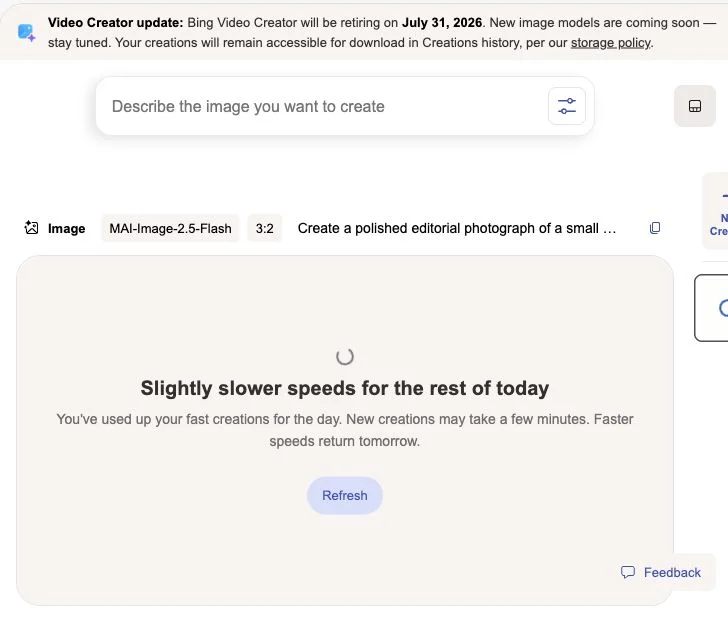
Hands-on test evidence from July 29, 2026. The screenshot is cropped to remove account-identifying information.
This is one account and one test session, so it should not be treated as a universal uptime measurement. It does demonstrate an important practical distinction: exhausting the fast allowance does not necessarily block creation, but it can move the request into a substantially slower queue.
Best for: quick personal projects, social graphics, and casual experimentation.
Important limitation: Microsoft’s consumer FAQ licenses Designer for personal, non-commercial use. Generated images include Content Credentials metadata.
3. Adobe Firefly: Best for Adobe Workflows
Adobe Firefly is a natural fit when the image will move into Photoshop, Express, or another Adobe product. Adobe requires an account before it will generate: while signed out, we could enter a prompt and select a model, but attempting to continue opened a sign-in gate.
We then tested a signed-in free account with Firefly Image 5 and the same original bakery prompt used for the Microsoft test. Firefly Image 5 offered Auto, 4:3, 1:1, 3:4, 16:9, and 9:16 aspect ratios. Because 3:2 was unavailable, we selected the nearest horizontal option, 16:9, along with the highest listed 2K resolution.
The test produced one image in 13.5 seconds. It followed the scene well: the storefront read as blue hour, the warm window light and reflections looked natural, the baker’s anatomy was convincing, and the small sign correctly displayed “Fresh 7:00.” The wider 16:9 framing differed from the requested 3:2 composition, but that was a limitation of the available Firefly Image 5 controls rather than a prompt-following failure.
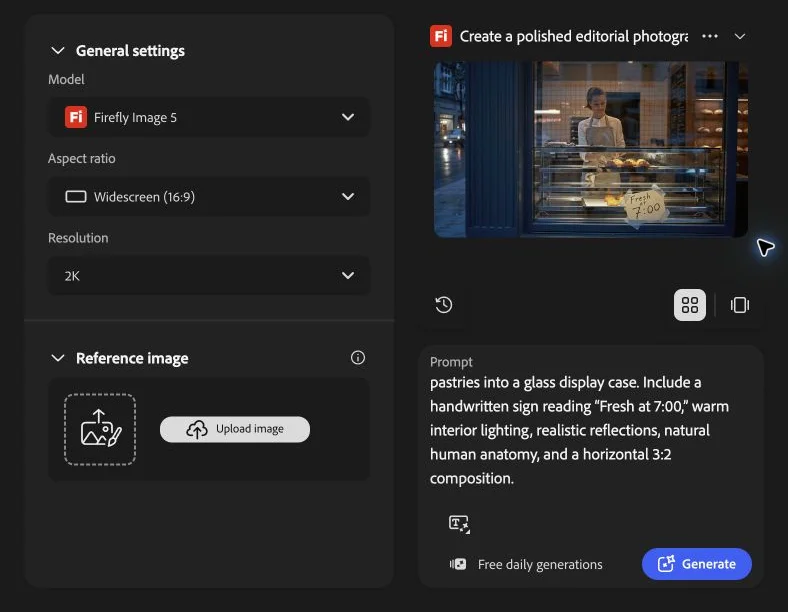
The free-account interface did not show a remaining number or per-generation cost. Before the image generation, after it, and after an upscale, it continued to display only “Free daily generations.” Adobe’s public plan page likewise does not state one fixed free-generation count, so users should not assume a specific daily allowance from older reviews.
Post-generation tools were unusually complete for a free workflow. The result could be downloaded, sent to Photoshop Web, used as a reference image, or opened in tools for prompt editing, fill, removal, and upscaling. The free account allowed a Firefly Upscaler run at 2x; its target preview was 2688×1536, and the upscale finished within 17.3 seconds in our session.
Firefly also attached a visible Content Credentials record. The result panel marked the image “Commercially safe,” identified Adobe Firefly as the source, recorded Adobe Inc. as the issuer, and stated that the content was completely AI-generated.
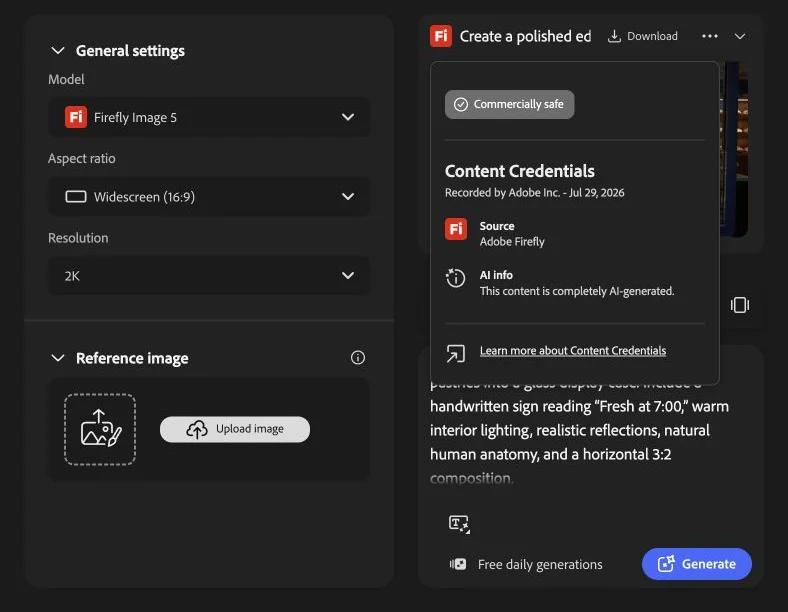
These measurements come from one account and one session, so generation speed can vary with demand. The absence of a numeric balance is the more durable takeaway: Firefly communicates a daily free allowance, but not a precise remaining quota in the working interface.
Best for: designers who value integration with editing and layout tools.
Rights and provenance: Adobe says Firefly-model outputs can be used commercially and automatically receive Content Credentials. Outputs from partner models available inside Firefly may have different terms.
4. Leonardo AI: Best for Iteration and Concept Art
Leonardo combines generation, model choices, reference controls, and editing features. Our newly signed-in free account displayed 150 tokens. We tested Leonardo’s own Lucid Origin model with Fast generation, Dynamic style, automatic prompt enhancement, a 16:9 aspect ratio, and the smallest available widescreen resolution of 1376×768.
The free account required a batch of four images: the one-, two-, and three-image choices were marked as premium options. Leonardo quoted 34 tokens before generation and reduced the balance from 150 to 116 immediately after submission, confirming the displayed cost exactly. All four images finished in under 10 seconds.
The batch was strong on atmosphere and composition. Every result looked like a warm bakery viewed through a window, reflections were believable, and the bakers’ anatomy was generally natural. Text rendering was the weak point. Only one result came close to the requested “Fresh at 7:00”; the others introduced misspellings, extra digits, or stray text.
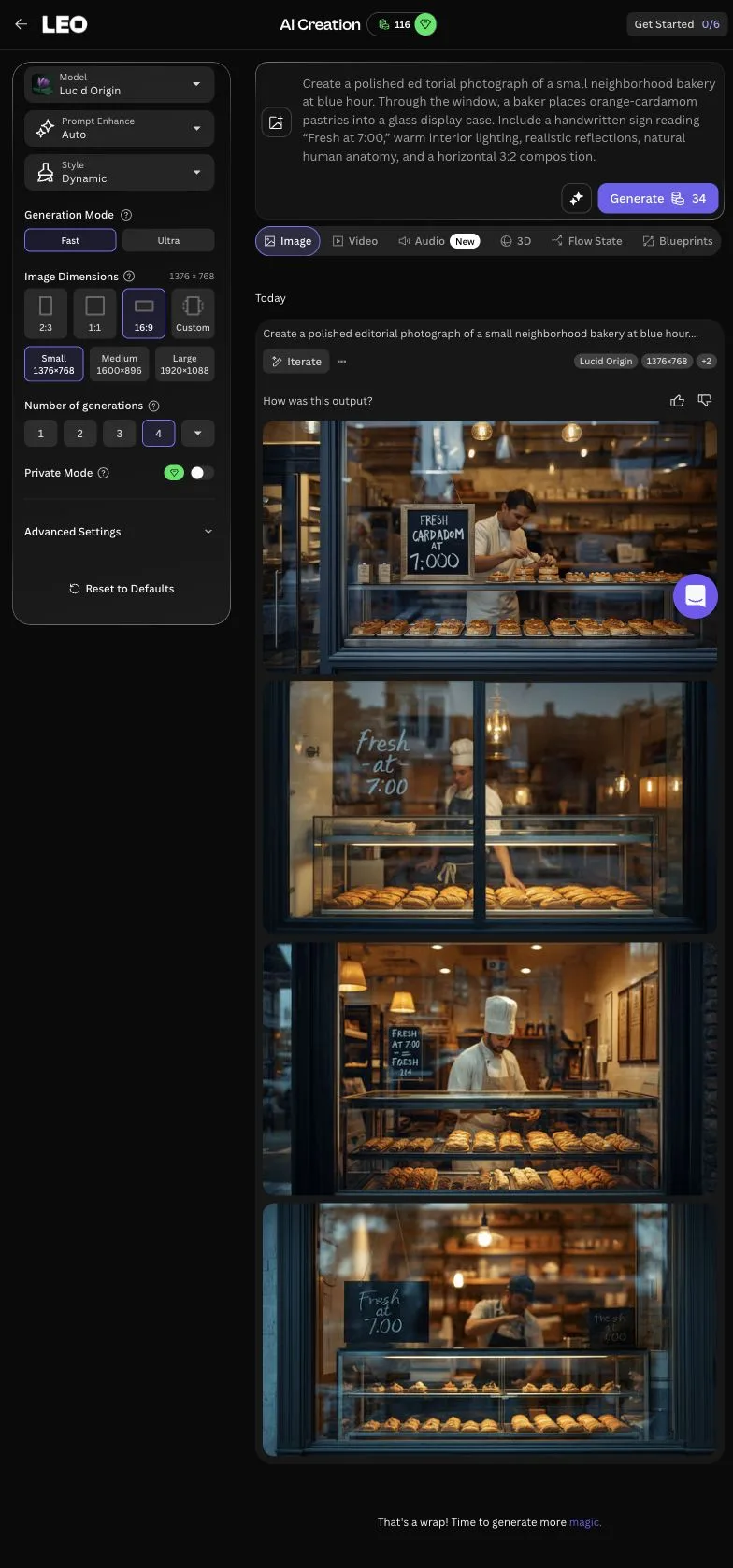
The downloaded result was a 1376×768 JPEG with no visible watermark. Its detail page exposed the prompt, model, Dynamic style, Fast mode, and seed, plus controls for remixing, using the image as a reference, creating video, editing in Canva, Magic Layers, and upscaling.

Leonardo’s Pro Upscaler previewed a 2x output of 2752×1536, or 4.2 megapixels, for another 18 tokens. We did not spend those additional tokens because the preview disclosed the cost and target dimensions needed for this comparison.
Best for: characters, game concepts, fantasy work, and users who want more controls than a basic prompt box.
Main limitation: Private Mode was marked as a premium feature, and the generated image appeared on a public profile page. The detail view also labeled deletion as a premium action. Leonardo grants free users a non-exclusive, royalty-free commercial-use license, while Leonardo retains rights to use, reproduce, modify, and distribute those images.
5. Ideogram: Best for Text and Graphic Layouts
Our signed-in test used Ideogram 4.0, the app’s latest model, with Turbo rendering and a horizontal 3:2 canvas. That setting produced 2496×1664 images. The fresh account showed 12 slow credits, while the free Count control was locked to four outputs. One batch reduced the balance to eight and completed in about 31 seconds.
Ideogram was the clearest typography winner in this test. All four bakery scenes reproduced the requested handwritten sign, “Fresh at 7:00,” correctly. The strongest outputs also had convincing blue-hour lighting, window reflections, pastry displays, and natural-looking bakers. The full-resolution download was already a WebP and had no visible watermark.

Best for: images that combine visual composition with typography.
Main limitation: Magic Prompt was locked to Auto, and the free-plan Publish to community switch remained enabled when we tried to turn it off. Free credits were offered only for Google, Apple, or Microsoft sign-in; the login screen said email accounts need a paid plan to generate.
6. Local Open Models: Best for AI Generators Without Credits
If your search is specifically “AI generators that don’t have credits,” a local workflow is the clearest answer. After downloading an open model and interface, you are not spending a hosted platform balance every time you click Generate.
That does not make generation cost-free. You provide:
- A compatible GPU and enough memory
- Storage for model files
- Setup and troubleshooting time
- Electricity and hardware wear
- Your own update, security, and backup process
Local generation is valuable for privacy, automation, and high-volume experimentation. It is usually a poor first choice for someone who wants a result in five minutes on an ordinary laptop. Rights depend on the exact model license: for example, Stability AI’s current Community License permits commercial use of its Core Models for individuals and organizations below $1 million in annual revenue.
For a broader decision framework, read Stable Diffusion alternatives for cloud, local, and open-source workflows.
Are Any Free AI Image Generators Truly Unlimited?
“Unlimited” nearly always has a qualifier:
- Unlimited generations, but only in a slow queue
- Unlimited use, but only for selected models
- Unlimited local runs, but limited by your hardware
- No monthly cap, but rate limits still apply
- Free output, but higher resolution or private generation is paid
Before choosing an unlimited option, look for the provider’s definition of:
- Generation speed
- Model availability
- Resolution
- Watermarks
- Private generation
- Commercial rights
A smaller transparent allowance is often more useful than an unlimited label with hidden restrictions.
How to Get Better Results Without Wasting Free Credits
Start with a Reusable Prompt Structure
Use this order:
[subject], [action or pose], [setting], [composition], [lighting], [visual style], [important constraints]Example:
Ceramic pour-over coffee set on a walnut counter, three-quarter product view,
soft window light from the left, muted editorial photography, clean beige wall,
no text, no logo, realistic glaze texture
The AI image prompt library has copyable portrait, product, logo, anime, and social-media examples.
Use a Lower-Cost Model for Drafts
Test composition and wording with a lower-cost option. Move to a premium model only after the subject, camera angle, and style are stable.
Save Every Setting
Record the prompt, model, aspect ratio, seed, reference image, and date. A saved prompt without its settings is difficult to reproduce.
Match the Model to the Job
Do not spend five generations forcing one model to do work that another model handles naturally. The text-to-image model guide explains how prompt following, typography, realism, and style control differ.
When to Upgrade
Consider a paid plan when:
- A queue is delaying client work
- You repeatedly run out of the free allowance
- You need private generation or higher resolution
- You need a specific premium model
- The license or support level matters to the project
Compare the monthly cost with the time lost moving prompts and assets between several free tools. The cheapest generation is not always the cheapest workflow.
Final Recommendation
Choose based on the restriction you actually need to avoid:
- No credit card: use a clearly documented free plan such as RenderFlow AI’s.
- No platform credits: run an open model locally.
- Several current models: use a multi-model interface.
- Typography: prioritize a generator designed for text and layout.
- Fast casual experiments: use the ecosystem account you already have.
Start with RenderFlow AI’s free image generator, compare a few current models with the same prompt, and keep the settings from the result you prefer.
Frequently Asked Questions
What is the best free AI image generator in 2026?
The best option depends on the job. RenderFlow AI is useful when you want several current image models in one browser workflow. Microsoft Designer and Adobe Firefly suit people already using those ecosystems. A self-hosted open model avoids platform credits but requires capable hardware and more setup.
Can I use RenderFlow AI without a credit card?
Yes. RenderFlow AI's Free plan requires registration but no credit card. The current plan includes 35 monthly credits for selected models.
Which AI image generators do not use credits?
Locally installed open-weight image models do not use a hosted platform's credit balance. They still consume your computer's GPU time and electricity. Most browser-based free generators meter use through credits, tokens, boosts, queues, or daily limits.
Is there a free AI image generator with no sign-up?
Most established cloud generators require an account. A local Stable Diffusion or Flux workflow can run without a cloud account after installation, but it is not the easiest option for beginners.
Can I use free AI-generated images commercially?
Commercial rights vary by provider, model, and plan. Review the provider's current terms before using an output in client work, advertising, packaging, or resale.
Related Articles
Best AI for Logo Design? Ideogram vs Recraft vs Qwen
We tested Ideogram 4, Recraft V4.1, and Qwen Image 2.0 across 15 original logo designs to find the best AI logo generator for business.
15 min read
GPT Image 2 vs Midjourney V8.1 & V8.2: 6-Prompt Test
We recreated six Midjourney V8.1 and V8.2 prompts with GPT Image 2. Compare realism, typography, prompt accuracy, API pricing, and business use.
14 min read
Seedream 5.0 Pro vs Nano Banana 2: Which AI Image Model Is Better?
We tested Seedream 5.0 Pro vs Nano Banana 2 with 16 original images. Compare quality, prompt accuracy, API price, speed, and best use cases.
12 min read
About the Author
AI Image & Video Generation Experts