Swap an outfit, a season, or a single prop while Flux Kontext Pro holds your subject, lighting, and composition exactly where the original photo put them.
The accessible Flux Kontext option for prompt-based image editing with balanced quality and speed.
Your generated image will appear here.
Enter a prompt and click 'Generate with Flux Kontext' — or start from an example:
Examples
Flux Kontext Pro before and after examples
Drag the handle to compare each source and result, or open the viewer for a closer look.
BeforeAfter
consistent changes / portrait workflows
Portrait outfit + setting change
Prompt: Change the charcoal blazer to a camel wool coat over the same white shirt, and move the woman from the office into a bright co-working lounge with green plants and warm wood shelves softly blurred behind her. Keep her face, hairstyle, skin tone, smile, and the natural window light direction exactly the same.
BeforeAfter
consistent changes
Product detail and surface swap
Prompt: Change the LED ring inside the transparent pebble speaker from warm orange to cool ice blue, and replace the walnut desk with a polished black marble surface with a subtle reflection. Keep the speaker's pebble shape, transparency, internal drivers, studio lighting, and light gray background exactly as they are.
BeforeAfter
prompt edits
Season change on a landscape
Prompt: Change this rice terrace landscape from spring sunrise to golden autumn harvest: ripe amber rice stalks on the terraces, warmer low sunlight, the mist slightly thinner, the farmer's clothing a touch heavier. Keep the terrace geometry, the water reflections, the farmer's position, and the panoramic composition exactly the same.
BeforeAfter
prompt edits on text
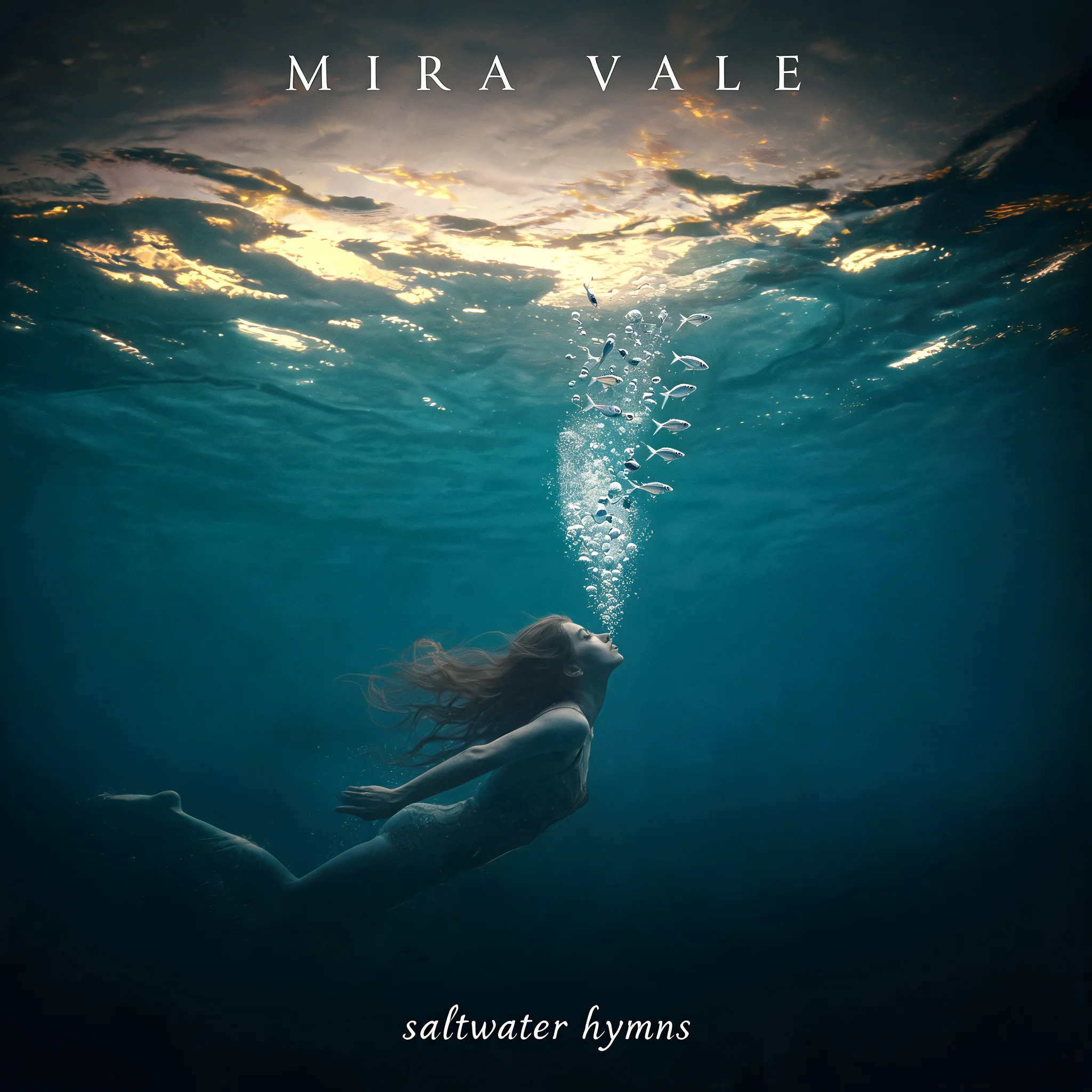
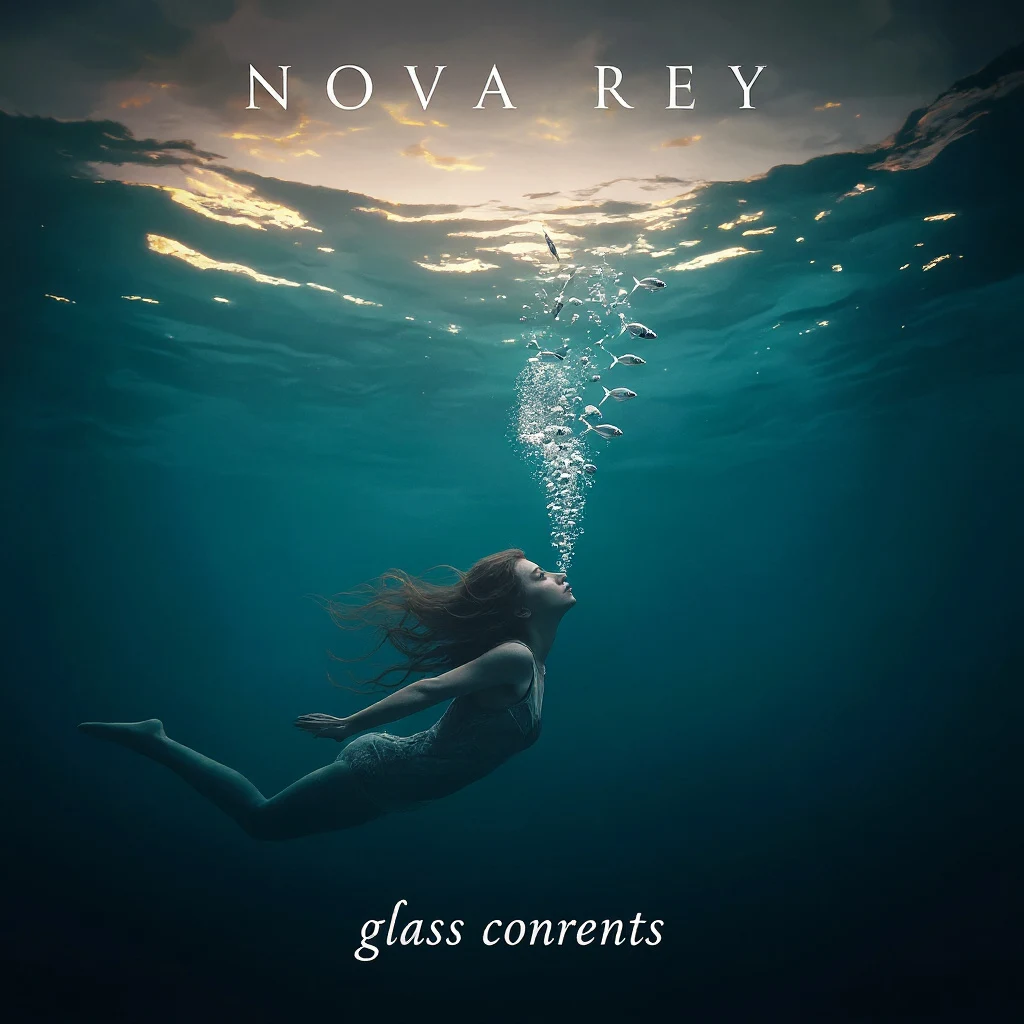
Cover typography swap
Prompt: Change the artist name at the top from "MIRA VALE" to "NOVA REY" in the same thin white uppercase letter style, and change the album title at the bottom from "saltwater hymns" to "glass currents" in the same small lowercase italics. Keep the underwater swimmer, the golden surface light, the silver fish, and the deep teal palette completely unchanged.
BeforeAfter
prompt edits
Illustration palette and mood shift
Prompt: Recolor this flat illustration from the warm terracotta-and-cream palette to a cool winter palette: slate blue mug interior, soft ice-blue steam clouds, a cream and pale gray background. Keep the person, the laptop, the bookshelf and lamp inside the mug, the composition, and the negative space on the right exactly the same.
BeforeAfter
fast Flux workflows
Beverage and light quick change
Prompt: Turn the drink in the mug into a matcha latte with a simple leaf-shaped latte-art pattern, and add soft morning sunlight falling across the counter from the left with a gentle highlight on the mug. Keep the mug's shape, color, position, the wooden counter, and everything else in the kitchen exactly the same.
Source: RandalWhitmore — CC-BY 2.0 via Flickr.
BeforeAfter
·
What makes Flux Kontext Pro a surgical editor?
Flux Kontext Pro is Black Forest Labs' in-context image editing model: instead of regenerating a picture from scratch, it reads your uploaded photo as the scene to preserve and applies only the change your prompt describes. That is why a request like "turn the grass into snow" leaves the person, the fence, and the late-afternoon light alone.
On RenderFlow AI, the dedicated Flux Kontext canvas exposes the controls that matter for this way of working — a single image upload, a Guidance Scale from 1 to 20, and nine aspect-ratio presets — at 4 credits per edit, with Flux Kontext Max one step up when a final frame needs sharper type and texture.
Why reach for Flux Kontext Pro when only one thing needs to change
One change lands, the rest stays put. Kontext Pro treats the uploaded image as context rather than noise, so asking to swap a water bottle
One change lands, the rest stays put. Kontext Pro treats the uploaded image as context rather than noise, so asking to swap a water bottle for a coffee cup keeps the model's hand, the desk, and the window light untouched. Product teams use this to fix one prop per pass instead of reshooting the whole set.
Follow-up edits chain without drift. Because each result still looks like your photo, you can feed it straight back in
Follow-up edits chain without drift. Because each result still looks like your photo, you can feed it straight back in for the next instruction — change the wall color, then the sofa fabric, then the time of day — and the room stays the same room across all three passes.
Identity survives the edit. Portraits and brand characters keep their recognizable features while clothing, backgrounds, or styling change around them, which makes Kontext Pro practical
Identity survives the edit. Portraits and brand characters keep their recognizable features while clothing, backgrounds, or styling change around them, which makes Kontext Pro practical for lookbook variations built from a single shoot.
Drafting stays cheap. At 4 credits per image with one Guidance Scale slider, Kontext Pro is the sensible place to work through ten art-direction variations before spending on a premium final pass.
Drafting stays cheap. At 4 credits per image with one Guidance Scale slider, Kontext Pro is the sensible place to work through ten art-direction variations before spending on a premium final pass.
Single-change edits Flux Kontext Pro handles cleanly
AI image editing
Product image editing
Portrait and outfit changes
Background and scene updates
Running a controlled edit on the Flux Kontext canvas
Upload the photo you want to keep
Start from the strongest original you have, because Kontext Pro preserves everything your instruction does not name. Opening from this page drops you into the Flux Kontext canvas with the model preselected — one image slot, no masking or layers to prepare.
Ask for exactly one change
Write the edit as a single, concrete instruction — "change the jacket to red leather" or "make the scene winter" — and quote any words that must appear. Stacking three requests into one prompt is the most common way to pull in details you wanted untouched; queue the next change as a follow-up pass instead.
Set Guidance Scale with intent
The default 3.5 balances fidelity against change for most retouch work. Nudge the 1–20 slider upward when the edit barely registers, and pull it back down when textures or faces start to look over-processed.
Pick the aspect ratio before you generate
The canvas offers nine presets from 21:9 to 9:21. Choose the crop the asset will actually ship in — 16:9 for a web hero, 9:16 for stories, 1:1 for catalog slots — so the edit composes for its destination instead of being cropped afterward.
Know when to step up to Kontext Max
If the frame needs crisp in-image text, or it is a hero asset where every texture will be inspected, rerun the winning prompt on Flux Kontext Max at 8 credits. For everything else, Pro's cheaper pass is the right finishing tool.
Frequently Asked Questions
What edits is Flux Kontext Pro best at?
Single, well-scoped changes to an existing photo: object and prop swaps, outfit changes, season or weather shifts, background replacement, and style transfers that must keep the original composition. It is an editor, not a generator — for images created from scratch, use Flux Pro.
How is Flux Kontext Pro different from Flux Kontext Max?
Both apply in-context, natural-language edits, but Max is the premium tier at 8 credits per image versus Pro at 4, with stronger typography rendering and maximum detail fidelity. Draft and iterate on Pro, then move to Max for final hero frames and edits that involve legible in-image text.
What does Guidance Scale do in Flux Kontext Pro?
Guidance Scale (1–20, default 3.5) controls how aggressively the model follows your instruction versus staying glued to the original image. Most edits work between 3 and 7; push higher only when the change is not showing up, and lower it if the result starts to look synthetic.
Can Flux Kontext Pro keep a person recognizable across several edits?
Yes — identity preservation is its signature strength. Upload the portrait, describe what changes around the person, and chain follow-up edits; the face and identifying features stay consistent across the series.
Why did my edit change things I never mentioned?
The usual causes are an instruction that is too broad ("make it better"), several changes packed into one prompt, or a Guidance Scale set too high. Narrow the instruction to one concrete change, name what should stay, and return Guidance Scale toward 3.5.
Which aspect ratios can Flux Kontext Pro export?
Nine presets are available in the canvas — 21:9, 16:9, 4:3, 3:2, 1:1, 2:3, 3:4, 9:16, and 9:21 — so you can compose the edit for its final placement instead of cropping afterward.